Review against the original
Review extracted data alongside the document. Source highlights help you locate values, and flags identify fields to check. Select document text to fill or correct a field.
Total 463.85
Extract details from bills and receipts, review them alongside the original documents, and download import files for Xero, QuickBooks Online and Zoho Books.
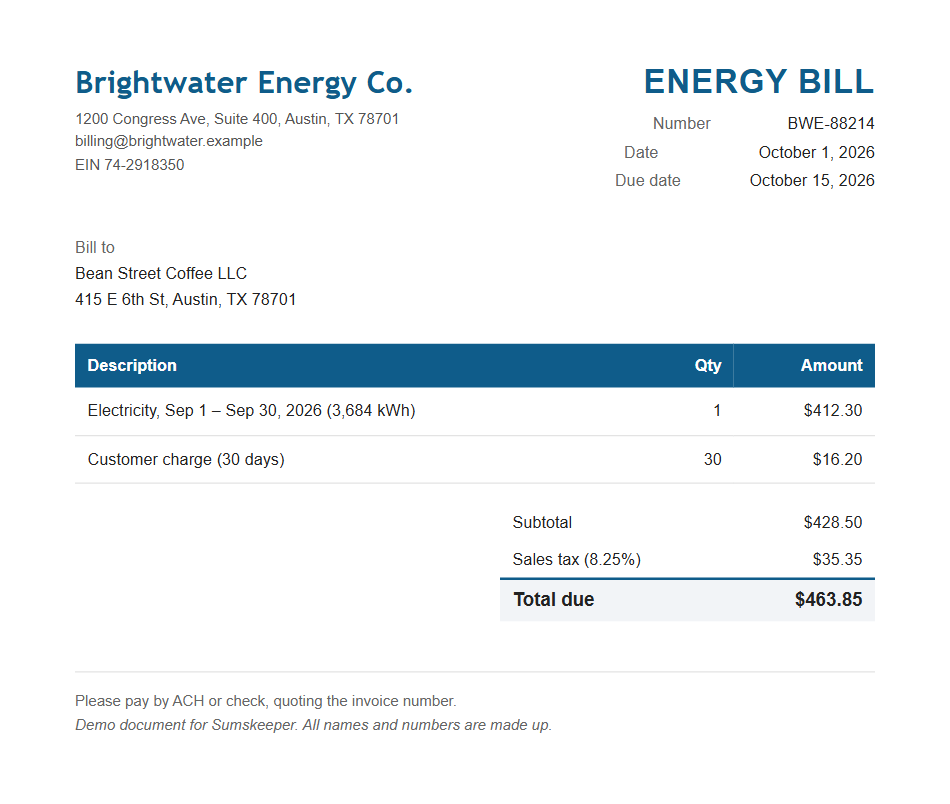
Hover over or select a value to highlight it on the document
Tested on 496 public scanned receipts from the SROIE dataset using Claude Haiku 5.5 in Sumskeeper. Results vary by document. Review extracted values before approving.
How it works
Add documents, review the details, assign accounts and run a monthly health check for each client.
Add PDFs, photos, scans or e-invoices. Sumskeeper extracts supplier details, invoice numbers, dates and amounts, checks the totals and flags possible duplicates or client name mismatches.
Source highlights help you locate extracted values on the document. Review flagged fields first, then select document text to fill or correct a field.
Approve a bill to save its account and tax rate as supplier defaults. Import past bills to get suggestions based on the client’s accounting history.
Check for possible duplicates, missing recurring bills and documents awaiting approval or export. Prepare a draft request for missing documents, then review it before sending.
Features
Review extracted data alongside the document. Source highlights help you locate values, and flags identify fields to check. Select document text to fill or correct a field.
For known suppliers, Sumskeeper flags bank details that differ from the last approved bill. Verify changes before paying.
Approve three bills from a supplier without corrections to enable bulk approval for eligible repeat bills. A correction resets the count.
Extract structured data from supported Factur-X, ZUGFeRD and UBL invoices without using reading credit.
Review possible duplicates, missing recurring bills and documents awaiting approval or export in one place.
Your documents, extracted data and supplier defaults are saved in this browser. Keep backups so you can recover your work or move it to another device.
Reading documents requires an internet connection and sends each document straight from your browser to our processing providers. Details
Watch
An unedited walkthrough, reading real documents: a PDF, a scan, a phone photo, a credit note, an e-invoice and a bill addressed to another business, checked, coded and exported to Xero.
Savings calculator
Enter your client count and monthly document volume to find a suitable plan and estimate time saved.
Start with reading credit for about 3,000 documents included. Top up only when you need to.
Monthly reading cost is your monthly volume at $10 for about 3,000 documents. Above 3,000 a month, the $25 pack (about 9,000 documents) costs less per document, and that lower figure is shown too. It starts once the about 3,000 documents included with each licence are used. Packs are paid in full when bought; there’s no subscription. Time saved assumes 20 seconds to review each bill. Actual usage and time vary; structured e-invoices use no reading credit.
Your data
Your documents are saved on your device. Sign in to access your plan and reading credit. See how storage, backups and reading work today.
Sign in to access your plan and remaining reading credit on another device. Client documents stay in the browser where you saved them; restore a backup to transfer them.
Review documents, run checks, export files and save backups offline. Reading documents requires an internet connection.
Download a client backup or choose a folder for automatic backups in a supported browser.
Sumskeeper creates import files. It does not access bank accounts, transfer money or make payments.
Pricing
Choose a plan for your client count and monthly document volume. Every plan includes all export formats. Tier 3 and above let you add your business name and logo to reports.
Every licence includes reading credit to get you started. When you need more, choose a one-time reading pack.
No automatic top-ups. No subscription.More reading, when you need it
See it with your own bills. Try 50 documents free No card required. Every licence has a 60-day money-back guarantee.
Your plan’s monthly document limit and its reading credit are separate. Review, coding, exports, health checks and structured e-invoices do not use reading credit.
Reading is included once per licence code. Purchased credit does not expire while its licence remains active. Each additional code raises your plan by one tier, up to Tier 4, and adds more included reading.
Lifetime access covers the software and improvements to its included features. Optional encrypted sync and team services are planned separately. See the roadmap.
Roadmap
Lifetime plans include improvements to the features you purchase. Planned features are not available yet; optional sync and team services will be sold separately.
Planned improvements
Planned for lifetime plans
Collection roadmap · plan not yet decided
Monthly plan, sold separately not part of the lifetime deal
Yes. Add your business as a client workspace and export to Xero, QuickBooks Online or Zoho Books. Tier 1 includes up to five workspaces.
No. Sign in to Sumskeeper with Google or email. The free trial includes 50 documents, once per person; each licence code includes credit for about 3,000 documents, once. More credit is available in prepaid packs where supported for your licence: $10 for about 3,000 documents or $25 for about 9,000. Credit does not expire while the licence remains active; actual usage varies.
The current app saves documents in your browser on your device. Our servers handle sign-in, licences, purchases and reading credit, rather than storing your workspace. Reading a document sends it straight from your browser to our processing providers, as described in the privacy policy. You can restrict requests to providers that support zero data retention. Optional end-to-end encrypted sync is planned separately and is not available yet. See the privacy policy.
Sign in with Google or the email linked to your licence to access your plan and remaining reading credit. Device sync is not available yet. Open Settings and choose Restore a backup to transfer each client workspace. You can download backups manually or choose a folder for automatic backups. Backups for clients with more than 400 documents exclude original files, so transfer any originals you need separately.
Sumskeeper creates CSV import files for Xero, QuickBooks Online and Zoho Books. You can also download all available document data as a general CSV file for a spreadsheet or other software.
The current app uses files: import your accounting data, then download prepared bills for upload to your accounting software. Direct accounting integrations are planned separately. Sumskeeper does not connect to bank accounts, transfer money or make payments.
Yes. In Chrome, Edge, Brave, Vivaldi and other Chromium-based browsers, Sumskeeper offers an Install app button when installation is available. You can also use your browser’s install option. Open it from your Start menu, dock or desktop. Review, checks, exports and backups work offline. Reading documents, sign-in and credit purchases require an internet connection.
Sumskeeper supports modern desktop browsers, including Chrome, Edge, Firefox, Safari, Brave and Vivaldi. App installation and automatic folder backups require a Chromium-based browser. Brave may disable folder access by default. If folder backups are unavailable, download backups regularly.
When we processed 496 public scanned receipts through the app, 98.4% of totals matched the test’s reference values and 0.6% were incorrect without being flagged. Results vary by document. Review values against the original before approving.
We will publish a final version without the licence check so the software you bought keeps working. This covers the app on your device, not continued operation of hosted services or the included reading service. Reading documents will still need an available provider and credit. This commitment is included in the terms.
Start with your own bills or explore the demo. No card required.